Run your whole business from one screen.
Opusite holds your team’s tasks, customers, support tickets, invoices, calls and files in one place. More than 30 tools, one login, one bill. Each morning everyone opens it and sees what needs them.

- Ask Opusite. Type what you need in plain words and it finds it or does it.
- Everything assigned to you, from every tool, in one list sorted by when it is due.
- Where the company is going, today’s meetings and the current sprint.
Plans
Pick the tools your company needs
Business is $150 a seat a month and Operations is $150, in steps of 3, 6 or 9 seats; both together are $225 a seat. Personal is $35 a month. Every plan includes the AI assistant. See what each plan includes
Workbench
Projects, sprints and boards
Plan the work, see who has what, and see what is stuck. Each person can switch between their own tasks and the whole team's.
- Mine, one person, or everyone.
- Work by stage, with what is due today in red.
- At a glance: what is late, due today, blocked, waiting on an update or due this week.
Instead of Jira, Asana or Monday

CRM
Customers, deals and follow-ups
Every call, email and meeting with a customer, the deals in play, and who you owe a reply. The day starts with what is overdue.
- Follow-ups that are late, due today and coming up.
- Check-ins with customers that are unfinished, overdue or coming up this week.
- Deals to move, with their value and close date.
Instead of HubSpot or Pipedrive

Help Desk
Customer emails become tickets
Each email gets an owner, a priority and the full history, so nothing waits in one person's inbox and anyone can pick it up.
- Mine, unassigned, or everything still open.
- Priority set per ticket.
- Who owns each one.
Instead of Zendesk or Freshdesk

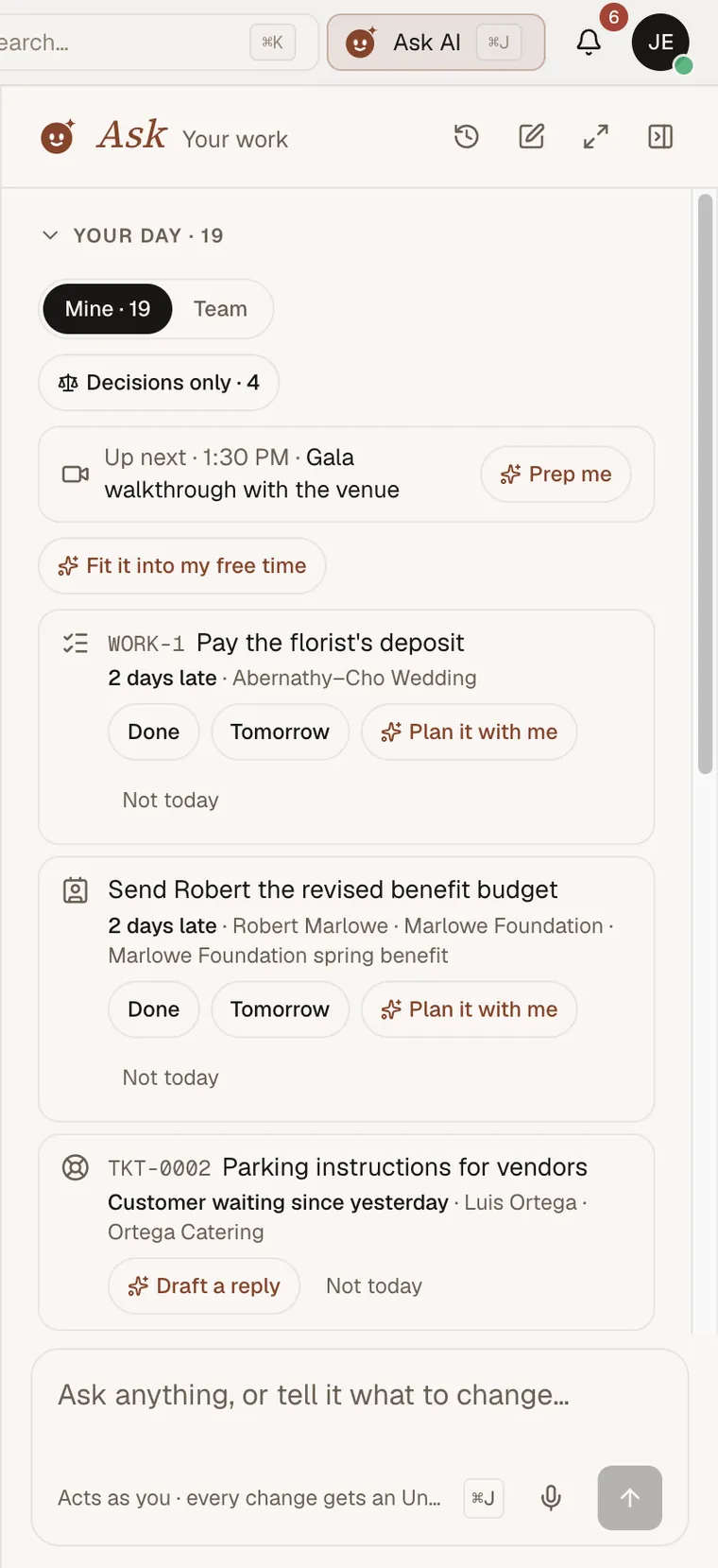
Ask Opusite
An assistant that works from your records
Ask sits beside every tool. It keeps a list of what needs you today, and next to each item offers the next step: prepare for the meeting, plan the task, draft the customer reply. It works as you, so it only sees and changes what you are allowed to.
- Prepares you for your next meeting.
- Plans a late task into your week.
- Drafts the reply to a waiting customer.
The tools
Every tool, one login
Projects
- Workbench
- Routines
- Calendar
- Sheets
- Boards
Sales and marketing
- CRM
- Campaigns
- Forms
- Appointments
- Events
- Cards
Support
- Help Desk
- Service Desk
Docs and talk
- Pages
- Files
- Messaging
- Meetings
- Presentations
- Proofing
- Training
- Updates
Money and paperwork
- Invoices
- Finance
- Expense Reports
- Signatures
- Vault
- Analytics
Field work
- Jobs
- Site Surveys
- Workforce
- Properties
- Operations
See a working day in Opusite.
A 30-minute call on Google Meet, weekdays 10 to 5 Eastern. We walk through a sample company set up in Opusite, then answer your questions about your own business. Booking takes a minute.
Book a demo